Posts

Showing posts with the label FAQ

OAR and IAR files: what is the difference?

Image
OAR and IAR files are very useful but they can be a bit confusing at first. OpenSimulator Archive (OAR) The OpenSimulator Archive (OAR) function has existed since OpenSimulator 0.5.9. The facility does a similar job to load-xml2/save-xml2 in that it saves prims so that they can be later reloaded. However, OpenSimulator archives (OAR) go a step further in that they can save all the necessary asset data so that you may fully restore the terrain, region parcel data, the textures of objects and their inventories when loaded onto a completely different system using a different asset database. Source: OpenSimulator.org OpenSimulator Inventory Archives (IARs) OpenSimulator Inventory Archives (IARs) are a means by which inventory folders and items can be saved offline to a single file (an IAR). This file can then be loaded into a different OpenSimulator installation. Like OpenSim Archives, IARs save all the necessary asset data required to fully restore the items including te...


Looking for OpenSim with HyperGrid capabiliy? Outworldz DreamWorld might be what you need.

Image
One of the great advantages of teaching with SoaS is the fact that Sim-on-a-Stick works offline. For some educators, however, this feature may actually be detrimental to their goals. They may want to create a grid instead of just one virtual world. They might even want to open their virtual world to the HyperGrid, so that educators and students from other grids may visit their sim. For those educators, Outworldz DreamWorld is probably a better option than SoaS. The Outworldz DreamWorld is a free, pre-packaged Windows-compatible virtual reality Opensimulator system that is easy to install, easy to run, and powerful. It it free and is open source. Anyone can run their own grid from home or at work. DreamWorld automatically configures routers for the Hypergrid with Plug and Play. It is preconfigured for the Hypergrid, and has both the "Diva" version of OpenSim 0.8.2.1 with Diva’s WiFi admin interface, and the latest Version (0.9) of Opensimulator for you to use. It ta...

How to install Sim-on-a-Stick on your computer

Image
Ener Hax, the founder of Sim-on-a-Stick, created a useful video-tutorial explaining how to install SoaS on a computer. The current version of SoaS is different, but the process of installing it remains the same. Learn more about using SoaS at An Introduction to Sim-on-a-Stick

How difficult is it to load an OAR file into SoaS?

Image
The OpenSimulator Archive (OAR) function has existed since OpenSimulator 0.5.9. The facility does a similar job to load-xml2/save-xml2 in that it saves prims so that they can be later reloaded. However, OpenSimulator archives (OAR) go a step further in that they can save all the necessary asset data so that you may fully restore the terrain, region parcel data, the textures of objects and their inventories when loaded onto a completely different system using a different asset database. Source: OpenSimulator.org OAR is one of the most amazing and useful functions of OpenSim that we can use with SoaS. However, after learning about OAR files for the first time during a presentation, educators often become worried about its complexity. Granted: at first glance, working with OAR files can look like something too complicated to even try in class. Actually, loading an OAR file using just the basic command is extremely easy - and fast, too, depending on the size of the file you'...

Do I have to install SoaS on a USB flash drive?

Image
Here's another frequently asked question: "Do I have to install Sim-on-a-Stick on a USB flash drive?" No, you don't. It's true that SoaS stands for Sim-on-a-Stick (as in USB flash drive or 'stick'), but if you decide to install it on your computer hard drive it will probably work faster. So when should you run SoaS on a USB flash drive? Here are a few examples: When you're planning to work on your SoaS projects using different computers (e.g. at school and at home), it might be better to have everything you need inside a USB flash drive. The same applies when you're giving a presentation and you want to show your audience what it's like to actually use a virtual world. If you're not using your own computer for the presentation it's probably safer to have all you need on a USB flash drive than to expect to be able to install SoaS, plus a Viewer and OAR files, on the computer available at the venue. Also, when y...

Why should educators care about SoaS?

Image
Sim-on-a-Stick (SoaS) is a standalone, single user Windows package of OpenSim that runs on a USB flash drive or other convenient location (like a computer hard drive). Basically, SoaS makes it possible for anyone to create and run a single user private virtual world that works offline on their computer hard drive or inside a USB flash drive. Why should educators care about SoaS? Sim-on-a-Stick can be especially useful for educators interested in virtual learning environments who are working in schools where: · there is no access to the Internet, and no OpenSim private grid available; · there is access to the Internet but also a firewall that prevents them from using any public OpenSim grid. Sim-on-a-Stick can also be very useful for educators who want to create a safe, easy to use, single user virtual learning environment that each student can take with them on a USB flash drive, and run on their home computer without having to install anything else on...

Is it true that SoaS is no longer being actively updated?

Image
Yes, SoaS is no longer being actively updated; but you can update its latest version with the Diva Updater function. There’s a step-by-step guide on the website homepage ( http://simonastick.com/ ). I must add that I’ve been working with Sim-on-a-Stick almost every day without even once having to use the Diva Updater function. Besides downloading the latest version of SoaS - that's SoaS 0.8pf (OpenSimulator 0.8.0 post-fixes) – the only thing that has changed since 2012 is the viewer I use with it: started using KokuaOS instead of Singularity.

How to turn Sim-on-a-Stick into a Multi-user Platform

Image
One of the questions about Sim-on-a-Stick (SoaS) educators tend to ask me a lot is: "Can more than one user access the same copy of SoaS at the same time?"  Many of you reading this post probably know by now that Sim-on-a-Stick (SoaS) is a "standalone,  single user  Windows package of OpenSim that runs on a USB flash drive or other convenient location." So, basically the question they're asking is: "Can  single-user SoaS  be turned into a  multi-user SoaS ?" And the answer is: Yes. It is is technically possible to have several computers access the same copy of SoaS at the same time. Unfortunately, doing that will not be as simple as running Sim-on-a-Stick for the first time. The good news is that there is a step-by-step guide explaining how to do it. Turning SoaS into a Multi-User Platform The process of creating a 'Multi-User SoaS' has two main steps: You will need to create a LAN (Local Area Network) in your classr...

Is your computer too old to run Sim-on-a-Stick? Probably not.

Image
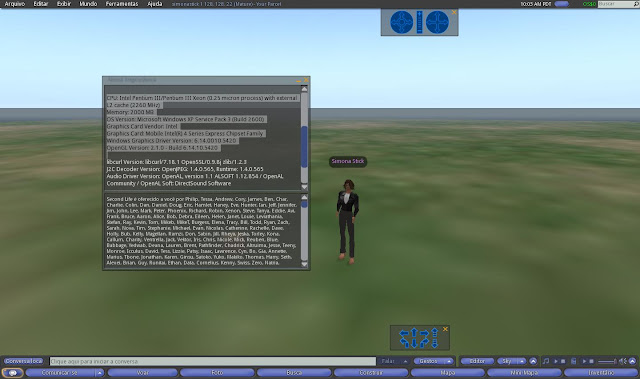
It's not unusual to hear educators say that their computers are not suitable to run virtual worlds. I suspect that idea comes from trying to use a virtual world like Second Life (SL) with a very taxing client like the official Linden Lab viewer. But are those same computers unsuitable to run Sim-on-a-Stick (SoaS)? To answer that question, I installed SoaS and Imprudence viewer on a USB drive and asked a friend to run SoaS on his 9 years old computer - the same computer on which he has always been unable to run SL using the official viewer: CPU: Intel Pentium III/Pentium III Xeon (0.25 micron process) with external L2 cache (2260 MHz) Memory: 2000 MB OS Version: Microsoft Windows XP Service Pack 3 (Build 2600) Graphics Card: Mobile Intel(R) 4 Series Express Chipset Family Windows Graphics Driver Version: 6.14.0010.5420 OpenGL Version: 2.1.0 - Build 6.14.10.5420 The result? SoaS worked. It was even possible to set graphics to High without crashing. So, is your comput...

How to install SoaS on a USB drive

Image
As you can see, installing SoaS on a pen drive is not hard at all - just remember that, depending on the quality of the USB drive you're using, running SoaS on a thumb drive can make it quite slow. About the viewer:  if you're planning to upload a lot of mesh content, instead of old Imprudence, you might want to use her younger 'sister', Kokua. Make sure you've downloaded KokuaOS (the OpenSim version of this viewer) Setup file to the USB drive before running it.